> ## Documentation Index
> Fetch the complete documentation index at: https://docs.gameball.co/llms.txt
> Use this file to discover all available pages before exploring further.
# How Do I Export My Points Data?
> Learn how to export your points data from the Gameball dashboard and what fields are included.
Gameball allows you to export your points data directly from the analytics page.
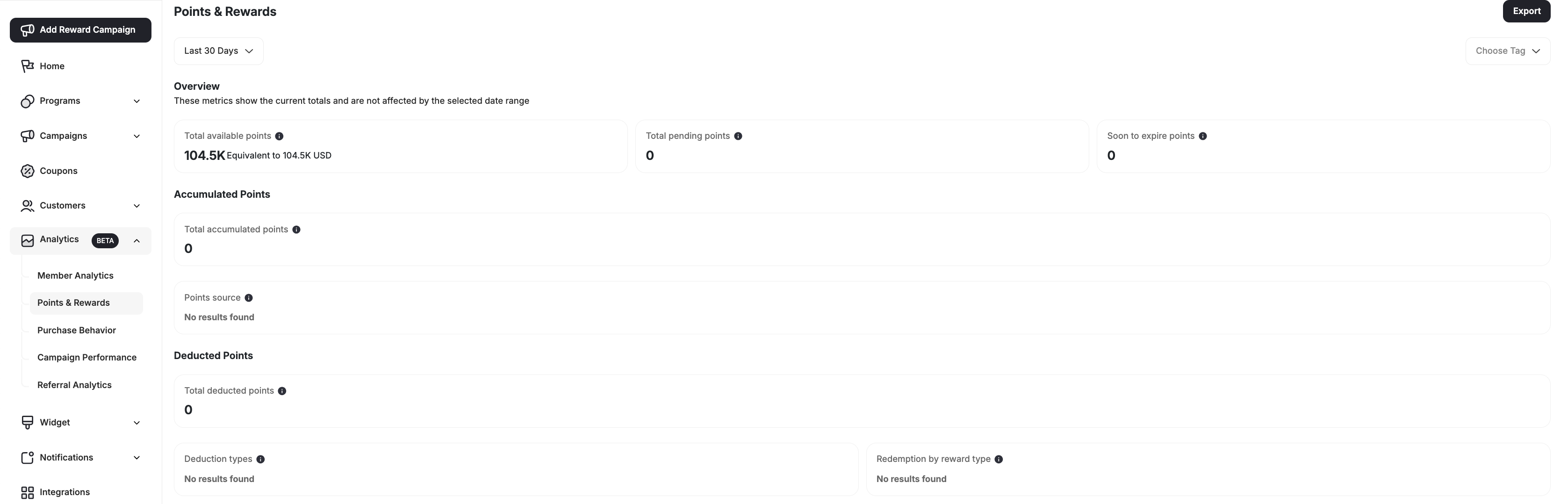 You can apply filters to narrow down the customer inclusions based on tags before exporting or export a broader dataset as needed.
***
## Step-by-Step Instructions
Go to the **Points & Rewards** page from the Gameball dashboard under the *Analytics* section in the left-side menu bar.
Apply filters if you'd like to export a specific tag's points.
Click **Export**.
Your data will be exported as a CSV file.
***
## Exported Fields and Their Descriptions
Here's a description of all the columns included in your exported file:
| Column Header | Description |
| - | - |
| `date` | The date for which the points data is reported |
| `earned_points` | Total points earned by customers on that date |
| `redeemed_points` | Points that were used/redeemed for rewards |
| `burned_points` | Points that were lost due to expiry, cancellation, partial refund or manual deduction |
| `cashback_reward_points` | Points earned specifically from purchase rewards |
| `refunded_points` | Points returned to customers after a refund process |
| `redeemed_fixed_points` | Points used in an order directly without coupon creation |
| `expired_points` | Points that expired before being redeemed |
| `cancelled_points` | Points cancelled due to order cancellation or reversal |
| `migrated_points` | Points transferred from a previous system or imported manually |
| `manual_added_points` | Points manually granted by admins |
| `manual_negative_points` | Points manually deducted by admins |
| `partially_refunded_points` | Points adjusted due to partial refunds |
| `campaign_points` | Points earned from campaigns (e.g., challenges, engagement triggers) |
| `referral_points` | Points earned through referral activities |
| `level_points` | Points awarded through tier progress |
| `redemption_rate` | The ratio of redeemed points to earned points, shown as a percentage |
***
## Related Articles
Learn about all customer attributes and how they are populated.
View and manage your full customer list.
Migrate customers from other loyalty programs.
Use tags to manually group and target customers.
This documentation is built and hosted on [Mintlify](https://mintlify.com), a developer documentation platform.
You can apply filters to narrow down the customer inclusions based on tags before exporting or export a broader dataset as needed.
***
## Step-by-Step Instructions
Go to the **Points & Rewards** page from the Gameball dashboard under the *Analytics* section in the left-side menu bar.
Apply filters if you'd like to export a specific tag's points.
Click **Export**.
Your data will be exported as a CSV file.
***
## Exported Fields and Their Descriptions
Here's a description of all the columns included in your exported file:
| Column Header | Description |
| - | - |
| `date` | The date for which the points data is reported |
| `earned_points` | Total points earned by customers on that date |
| `redeemed_points` | Points that were used/redeemed for rewards |
| `burned_points` | Points that were lost due to expiry, cancellation, partial refund or manual deduction |
| `cashback_reward_points` | Points earned specifically from purchase rewards |
| `refunded_points` | Points returned to customers after a refund process |
| `redeemed_fixed_points` | Points used in an order directly without coupon creation |
| `expired_points` | Points that expired before being redeemed |
| `cancelled_points` | Points cancelled due to order cancellation or reversal |
| `migrated_points` | Points transferred from a previous system or imported manually |
| `manual_added_points` | Points manually granted by admins |
| `manual_negative_points` | Points manually deducted by admins |
| `partially_refunded_points` | Points adjusted due to partial refunds |
| `campaign_points` | Points earned from campaigns (e.g., challenges, engagement triggers) |
| `referral_points` | Points earned through referral activities |
| `level_points` | Points awarded through tier progress |
| `redemption_rate` | The ratio of redeemed points to earned points, shown as a percentage |
***
## Related Articles
Learn about all customer attributes and how they are populated.
View and manage your full customer list.
Migrate customers from other loyalty programs.
Use tags to manually group and target customers.
This documentation is built and hosted on [Mintlify](https://mintlify.com), a developer documentation platform.